


Why Negative Keywords in Google Ads Can Save You Thousands of Rupees Every Month


Let me tell you about a furniture store owner in Pune named Vikram.
Vikram had been running Google Ads for about four months. He sold premium handcrafted wooden furniture — dining tables, wardrobes, bed frames, bookshelves. His products were high quality. His prices were fair. His showroom was beautiful. And he had invested a reasonable monthly budget into Google Ads because a friend had told him it was the best way to reach people who were actively looking to buy furniture.
The first month felt promising. His ads were getting clicks. Traffic to his website was up. He was getting enquiries — not as many as he had hoped, but some.
By the second month, the clicks were still coming but the enquiries were not growing proportionally. By the third month, he was spending more than he had planned and feeling increasingly uneasy about what he was actually getting for it.
He hired a digital marketing consultant named Megha to review his account.
Megha spent an afternoon going through the Search Terms Report — the part of Google Ads that shows you the actual words people typed before clicking your ad. What she found made her wince.
Here is a sample of what Vikram’s furniture ads had been showing up for — and what he had been paying for — over four months:
“Furniture polish remover” “Wooden furniture repair near me” “Antique furniture auction” “Furniture making course Pune” “Office furniture second hand” “Plastic furniture cheap” “How to paint old furniture” “Furniture donation pick up” “Cardboard furniture DIY” “Furniture warehouse job vacancy” “Miniature furniture for dollhouse” “Rent furniture for photo shoot” “Furniture making wood types” “IKEA furniture assembly” “Furniture disposal service”
Vikram stared at the list in silence for a moment.

“I have been paying for people searching for dollhouse furniture?” he said.
“Yes,” said Megha. “And people looking for furniture jobs. And people who want to donate their old furniture. And people who want to repair furniture themselves. And people who were looking for IKEA — a brand you do not stock and cannot compete with on price anyway.”
Vikram had been running Google Ads for four months without a single negative keyword in his account. Every rupee he had spent on those irrelevant clicks was gone — not invested in reaching potential customers, but burned on searches that had absolutely no chance of resulting in a purchase from his store.
Megha spent three hours building a comprehensive negative keyword list. She uploaded it to his account. Within two weeks, Vikram’s cost per enquiry had dropped by nearly forty percent — not because his ads had improved, not because his website had changed, not because his budget had increased. Simply because he had stopped paying to reach people who were never going to buy from him.
This is the story of negative keywords. And it is one of the most important stories in all of Google Ads.
What Negative Keywords Are — The Concept That Changes Everything
If you have been running Google Ads without a thorough understanding of negative keywords, you are almost certainly wasting a significant portion of your budget every single month. Not because your ads are bad. Not because your products are uncompetitive. But because Google’s matching system is far broader than most advertisers realise — and without negative keywords to constrain it, your ads will appear for searches that have nothing to do with what you are selling.
Let us start with the basics.
In Google Ads, you choose keywords that represent the searches you want your ad to appear for. You might bid on “wooden furniture Pune” because you want to reach people searching for wooden furniture in Pune. So far, so logical.
But Google does not only show your ad when someone types the exact phrase “wooden furniture Pune.” Depending on your match type settings, Google will also show your ad for searches it considers related to your keyword. And Google’s interpretation of “related” is sometimes genuinely helpful — and sometimes bewilderingly broad.
A negative keyword is a word or phrase that you add to your campaign to tell Google: do not show my ad when this word or phrase appears in the search query.
If Vikram had added “dollhouse” as a negative keyword, his ad would never have shown for “miniature furniture for dollhouse.” If he had added “job” as a negative keyword, his ad would not have shown for “furniture warehouse job vacancy.” If he had added “DIY” as a negative keyword, it would not have shown for “cardboard furniture DIY.”
Each negative keyword you add is a filter — a rule that prevents your ad from being shown to an irrelevant audience. And every irrelevant click you prevent is money that stays in your pocket rather than going to Google for a search that was never going to convert.
This is the power of negative keywords. They are not a complicated concept. They are not technically difficult to implement. But they require knowledge, systematic thinking, and ongoing attention — and most businesses running their own Google Ads either do not know about them or dramatically underestimate their importance.
How Google’s Matching System Works — And Why It Creates the Problem
To understand why negative keywords are so necessary, you need to understand how Google’s keyword matching system works — because it is more expansive than most people expect.
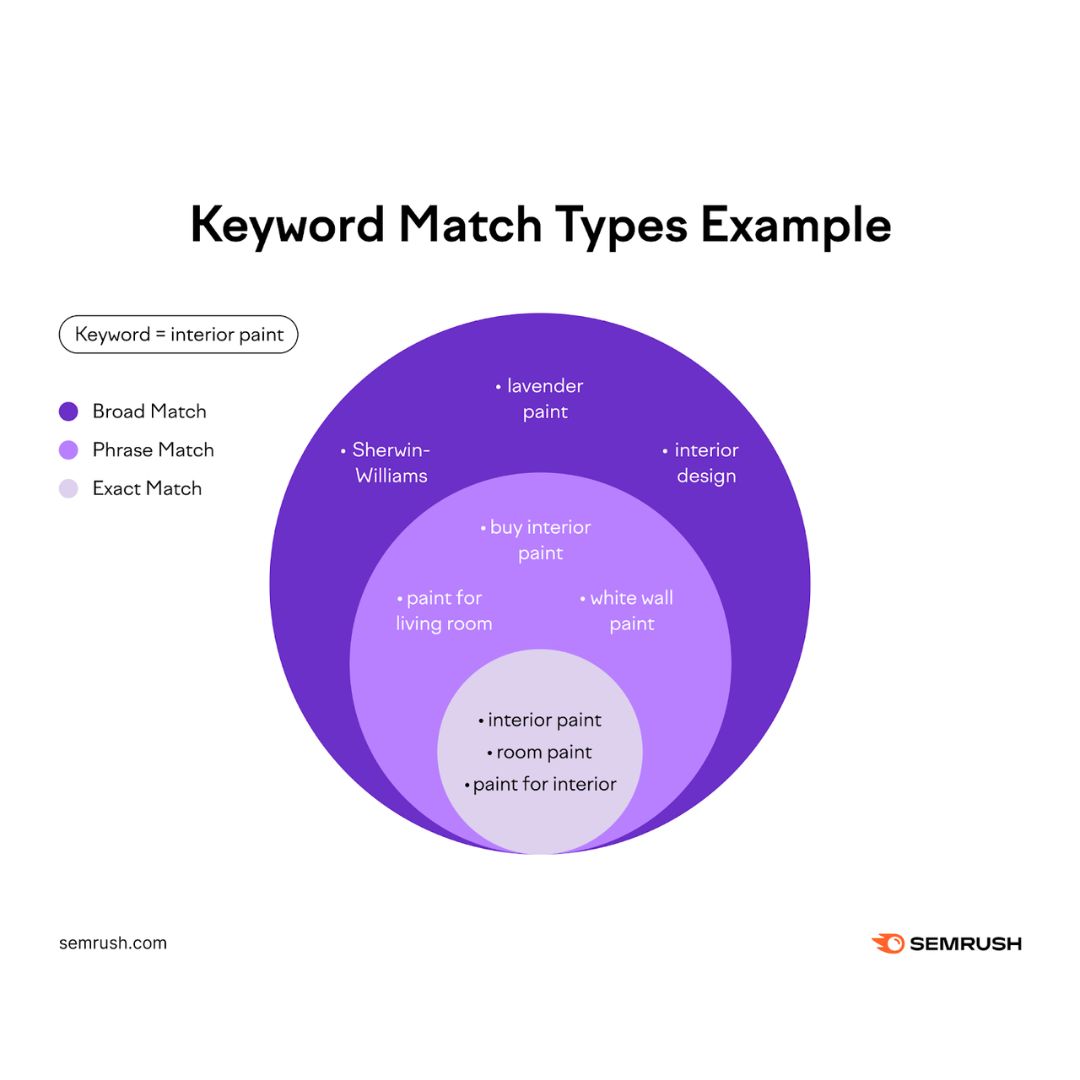
Google offers several match types that determine how closely a search query needs to match your keyword before your ad is shown.
Broad Match is the most expansive. When you use broad match — which is now Google’s default if you do not specify otherwise — your ad can appear for searches that Google considers semantically related to your keyword. This can include synonyms, related concepts, and searches that Google’s algorithm believes share the same intent as your keyword — even if the actual words are very different.
If your keyword is “wooden furniture” on broad match, Google might show your ad for searches like “timber home decor,” “natural material shelving,” “wood craft items,” or — as Vikram discovered — “furniture making wood types.” Google has decided that these searches are related enough to your keyword to warrant showing your ad. Whether you agree with that assessment is another matter.
Phrase Match is more restrictive. Your ad will show for searches that include the meaning of your keyword phrase, in order, but may include additional words before or after. A phrase match keyword of “wooden furniture” would show for “handcrafted wooden furniture Pune” or “buy wooden furniture online” — but would be less likely to show for the tangentially related searches that broad match triggers.
Exact Match is the most restrictive. Your ad shows only when someone searches for your exact keyword or very close variants — minor misspellings, singular or plural forms, abbreviations. An exact match keyword of [wooden furniture] would primarily show for “wooden furniture” and very close variations.
Most Google Ads accounts use a combination of these match types. And particularly with broad match — which Google now promotes and defaults to — the net that catches searches is very wide indeed.
This breadth is not inherently bad. Broad match can surface relevant searches you had not thought to bid on explicitly. But it also surfaces irrelevant searches with frustrating regularity. And without negative keywords to filter out the irrelevant ones, you are paying for every single click — whether it comes from your ideal customer or from someone who wants to build a dollhouse.
The True Cost of Missing Negative Keywords — A Calculation That Will Shock You
Most business owners have a vague sense that some of their Google Ads clicks might be irrelevant. But because the problem is invisible in day-to-day account management — you see clicks and costs, not the reasons behind them — its true magnitude is easy to underestimate.
Let me walk you through a calculation that makes the cost concrete.
Imagine a business spending ₹50,000 per month on Google Ads. Their average cost per click is ₹25. That means they are getting approximately 2,000 clicks per month.
Now imagine — and this is conservative based on typical account audits — that 30 percent of those clicks are coming from irrelevant searches. People who will never be customers. People looking for something entirely different from what the business sells.
That is 600 clicks per month on irrelevant searches. At ₹25 per click, that is ₹15,000 per month spent on people who are not potential customers.
Over a year, that is ₹1,80,000. Gone. Not invested. Wasted.
And that is at a 30 percent irrelevancy rate, which is conservative. Accounts that have been running without negative keywords for several months often have irrelevancy rates of 40, 50, or even higher percent of their total clicks.
For a business spending ₹1,00,000 per month on Google Ads with a 40 percent irrelevancy rate — that is ₹40,000 per month, ₹4,80,000 per year, spent entirely on clicks from people who were never going to become customers.
This money does not disappear quietly. It actively reduces the results you see from your campaigns. Your cost per lead goes up. Your cost per customer acquisition goes up. Your return on ad spend goes down. And because the clicks are still coming in, you may not immediately realise that a significant fraction of them are worthless — you just see your campaigns performing below expectation and wonder why.
Negative keywords fix this problem at the source. They do not improve your ads. They do not change your landing pages. They simply ensure that the budget you are spending reaches people who have at least some plausible reason to be interested in what you sell.
The Search Terms Report — Your Map to Hidden Waste
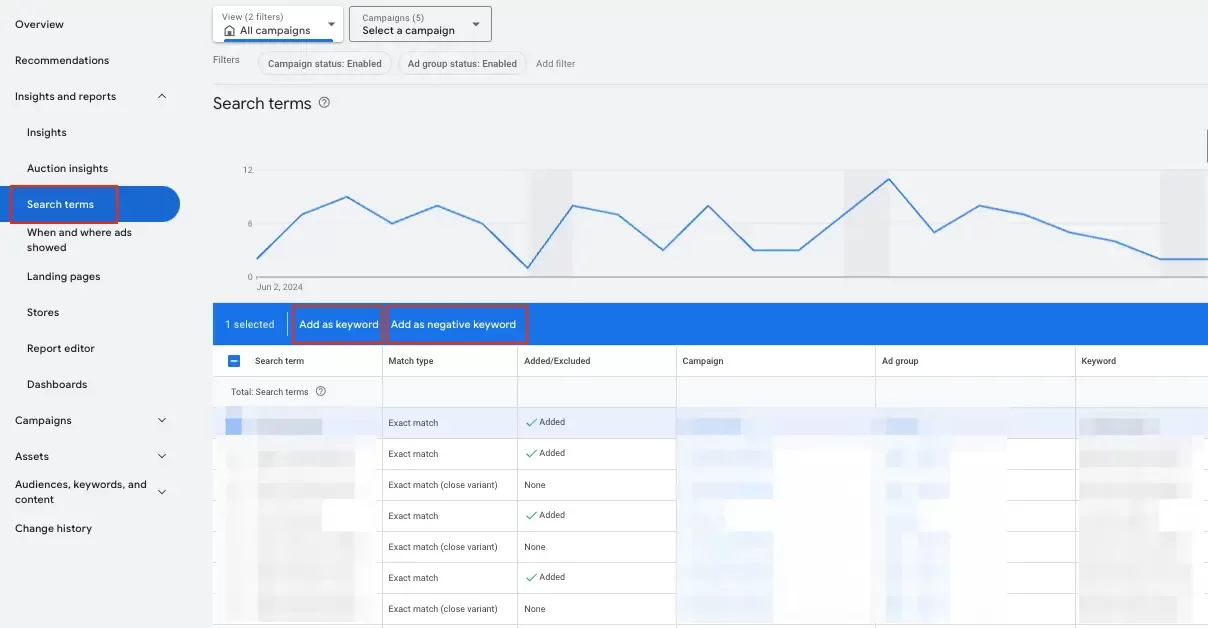
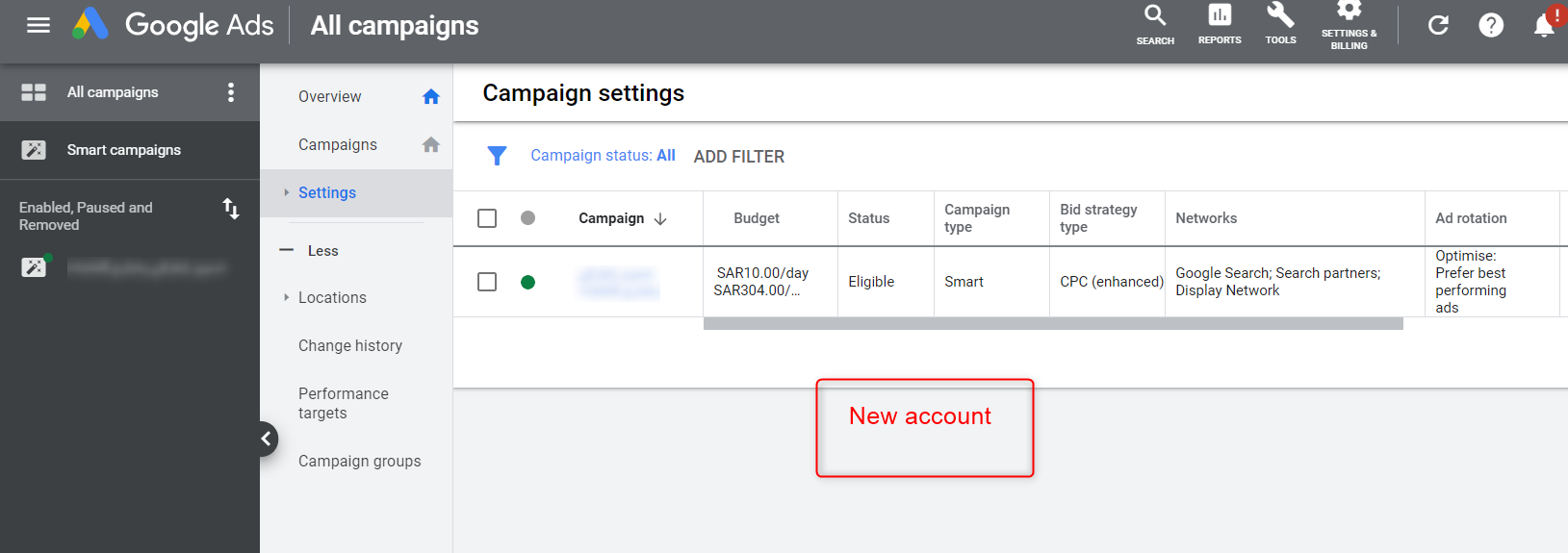
The single most important tool for identifying negative keywords in your account is the Search Terms Report. If you have been running Google Ads and have never opened this report, do it today. What you find may be alarming — but it will also be actionable.
The Search Terms Report shows you the actual search queries that triggered your ads and resulted in clicks. Not the keywords you bid on — the actual words real people typed into Google before your ad appeared and they clicked on it.
This distinction is critical. Your keywords are your intentions — the searches you wanted to capture. The Search Terms Report shows you reality — the searches you actually captured, including all the ones you did not intend to.
To find the Search Terms Report: in your Google Ads account, navigate to the Keywords section and look for “Search Terms” — it may be in a tab or submenu depending on the interface version. Set the date range to cover at least the last 30 days, preferably 90 days if the account has been running that long. Then download or scroll through every search term that triggered your ads.
As you go through the list, ask yourself one question about each search term: would the person who typed this ever become a customer of mine?
If the answer is clearly yes — do nothing. That search is doing its job.
If the answer is possibly, depending on context — make a note to monitor it.
If the answer is clearly no — this person is looking for something I do not sell, or they are in a completely different stage of intent, or they are a completely different type of person than my customer — add the relevant word or phrase to your negative keyword list immediately.
Go through the entire list systematically. For a campaign that has been running for several months without negative keywords, this initial cleanup session may take several hours. It is worth every minute.
Categories of Negative Keywords — The Systematic Approach
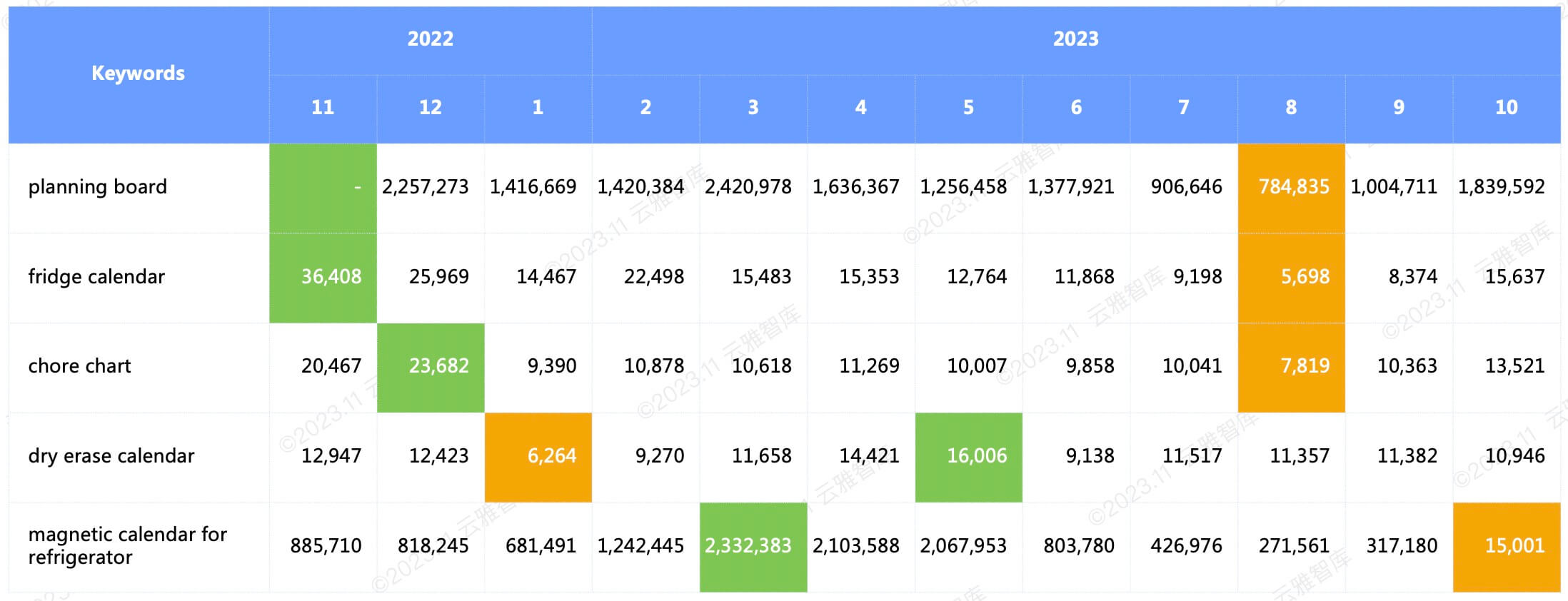
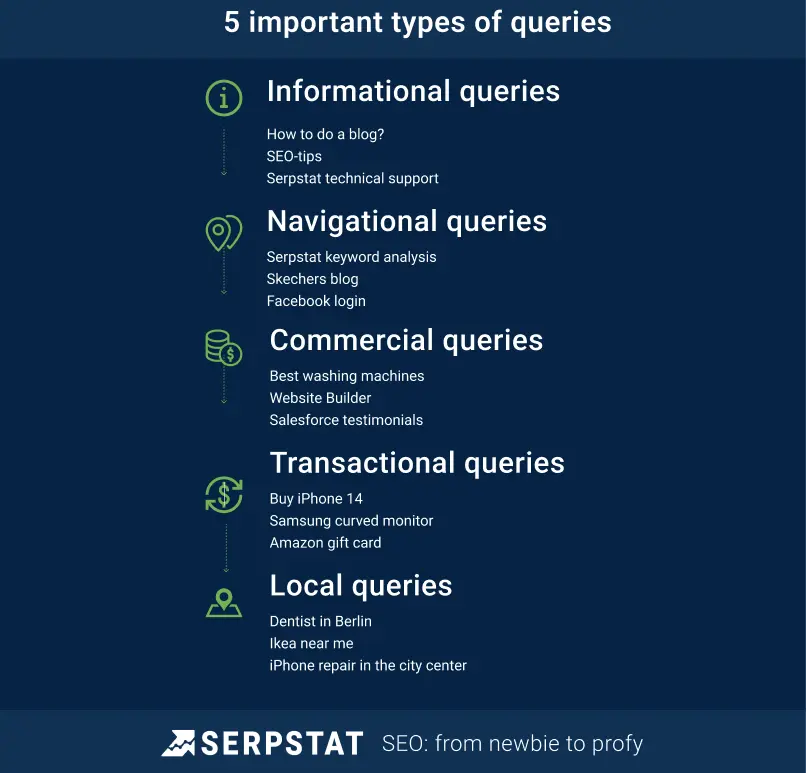
Rather than adding negative keywords randomly as you encounter irrelevant search terms, it helps to think systematically about the categories of searches you want to exclude. For most businesses, the same categories of irrelevant searches recur with predictable regularity.
The DIY and How-To Category
People searching for how to do something themselves are not looking to hire someone or buy a product. A painting company should exclude searches containing “how to,” “DIY,” “tutorial,” “tips,” “guide,” “yourself.” A pest control business should exclude “home remedy,” “natural solution,” “how to kill,” “DIY treatment.” A furniture seller should exclude “how to repair,” “how to paint,” “how to restore,” “furniture making.”
These searches represent people who have decided to handle the problem themselves — the opposite of your target customer.
The Job Seeker Category
Anyone searching in relation to employment rather than purchasing your product or service. Negative keywords in this category include: “job,” “vacancy,” “careers,” “hiring,” “salary,” “fresher,” “work from home,” “internship,” “apply now.”
A pest control company does not want to pay for clicks from people searching “pest control technician job vacancy.” A hospital does not want to pay for clicks from people searching “hospital nurse vacancy Hyderabad.”
The Education and Research Category
People searching to learn about your industry rather than to purchase from it. This includes searches containing “course,” “training,” “certification,” “degree,” “college,” “university,” “study,” “learn,” “exam,” “syllabus.” A digital marketing agency does not want to show ads to people searching “digital marketing course.” A law firm does not want to show ads to people searching “law degree.”
The Second-Hand and Budget Category
If you sell new products at standard prices, exclude searches that indicate the person is looking for something significantly cheaper or used. Negative keywords in this category include: “second hand,” “used,” “old,” “secondhand,” “refurbished,” “cheap,” “free,” “budget,” “lowest price,” “discount” (unless you genuinely offer discounts you want to promote).
For premium or mid-range products, excluding these searches prevents attracting customers whose budget expectations are fundamentally misaligned with your pricing.
The Wrong Geography Category
If you serve a specific location — a city, a region, a state — exclude searches containing other location names that people might pair with your product keywords. A Hyderabad restaurant should exclude Mumbai, Delhi, Bangalore, Chennai, and other cities. A Pune lawyer should exclude other cities from his search terms.
This is particularly important for businesses that use broad or phrase match keywords, as Google may match them to geographically irrelevant searches even when the location is specified in targeting settings.
The Competitor and Brand Category
Searches for specific competitors or other brands are typically poor investments for most businesses. A customer searching for “IKEA furniture” is looking for IKEA — not your handcrafted wooden furniture store. A patient searching for “Apollo Hospital Hyderabad” is looking for Apollo — not your clinic.
Unless you have a specific competitor-targeting strategy that you are executing intentionally, searches for competitor names should generally be excluded.
The Information and Academic Category
Searches for information, history, research, or academic content related to your industry. “History of,” “definition of,” “what is,” “meaning of,” “research on,” “statistics,” “report on.” These are people seeking knowledge, not products or services.
The Wrong Product or Service Variant Category
This is highly specific to each business but critically important. A business selling premium products needs to exclude searches for cheap alternatives. A business selling products for adults needs to exclude child-related searches. A business selling a specific type of product needs to exclude all the related but different product types that share keyword overlap.
Vikram’s furniture business needed to exclude “dollhouse furniture,” “miniature furniture,” “plastic furniture,” “cardboard furniture,” “rental furniture” — all products adjacent to but fundamentally different from what he sold.
Match Types for Negative Keywords — Getting the Precision Right
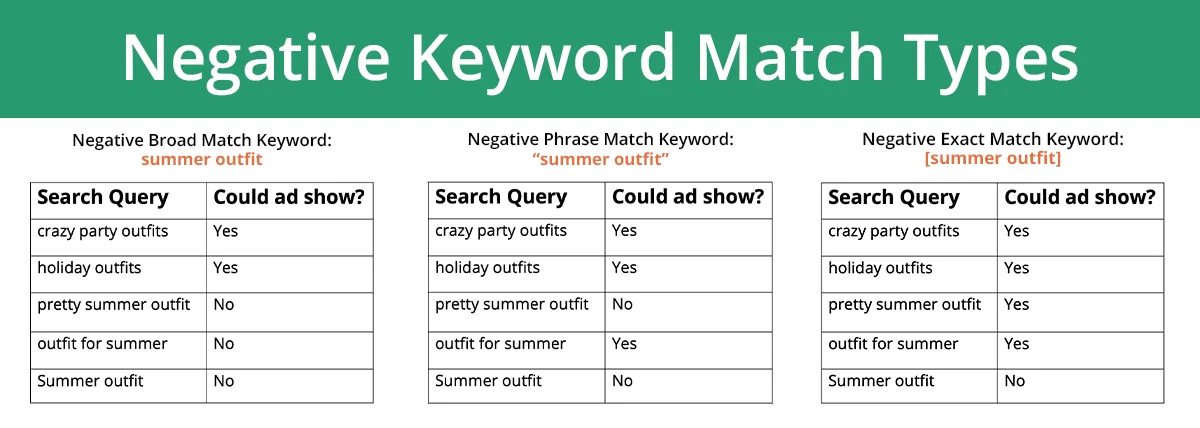
Just as positive keywords have match types, negative keywords have match types too — and using the right match type for each negative keyword matters.
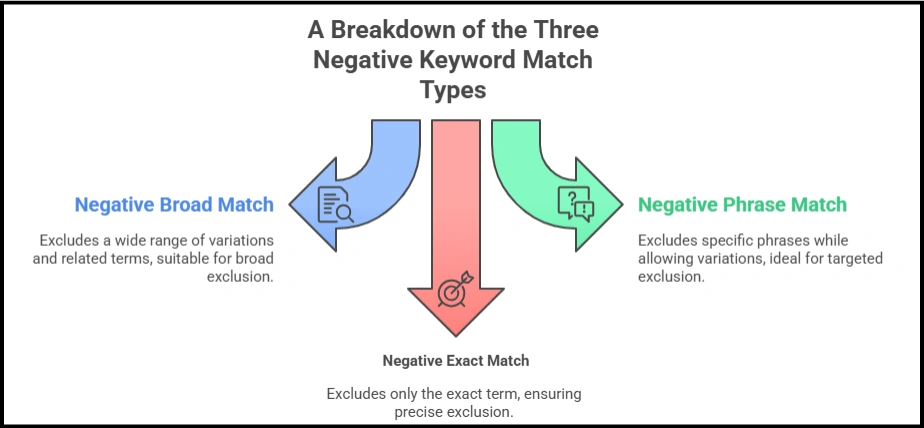
Negative Broad Match for negative keywords works differently from positive broad match. A negative broad match keyword will prevent your ad from showing when all the words in your negative keyword appear in the search query, in any order. If your negative broad match keyword is “how to repair,” your ad will not show for “how to repair wooden furniture” or “repair furniture how to” — but might still show for “furniture repair tips” since not all the exact words appear together.
Negative Phrase Match prevents your ad from showing when the exact phrase appears in the search query, in that order. A negative phrase match of “how to repair” would block “how to repair furniture” and “how to repair a wooden table” but not “furniture repair how to.” Phrase match negatives give you more precision and are appropriate when you want to block a specific word sequence without blocking all variations.
Negative Exact Match prevents your ad from showing only when someone searches for that exact term — nothing more, nothing less. This is appropriate for very specific searches you want to exclude without risk of blocking too broadly.
For most common negative keywords — the category-level exclusions like “job,” “DIY,” “course,” “free” — negative broad match is appropriate and efficient. For more nuanced exclusions where you want to be specific about the phrase, phrase match or exact match gives you more control.
Building a Negative Keyword List Before You Launch — Proactive Protection
Everything we have discussed so far has been about cleaning up an existing account — identifying irrelevant searches that have already cost you money and adding negative keywords to prevent future waste.
But the most cost-efficient approach is to build a negative keyword list before you launch a new campaign — protecting your budget from day one rather than recovering waste after it has already occurred.
This requires thinking systematically about your business and your keywords before you spend anything.
Take each keyword you plan to bid on and ask: what are all the different reasons someone might search for this term, other than wanting to buy what I am selling?
For a keyword like “wooden furniture”: Someone might be searching for furniture repair or refinishing services. Someone might be looking for furniture making courses. Someone might be researching the history of wooden furniture. Someone might be looking for furniture rental. Someone might be looking for second-hand furniture. Someone might be searching for a specific furniture brand. Someone might be looking for furniture donations. Someone might be looking for furniture disposal. Someone might be looking for furniture assembly instructions. Someone might be searching for furniture for a specific use case you do not serve — office furniture, outdoor furniture, children’s furniture.
Each of these use cases is a category of searches you can anticipate and exclude from day one. Before you spend a single rupee, you can build a negative keyword list of fifty to one hundred terms that will protect your budget from the most predictable sources of irrelevance.
This proactive list will not be perfect — there will always be irrelevant searches you did not anticipate. But it will eliminate the most obvious and most costly sources of wasted spend from the very beginning, making your initial weeks of data far cleaner and your subsequent optimisation far easier.
Negative Keyword Lists — Sharing Protection Across Campaigns
Google Ads allows you to create negative keyword lists that can be applied to multiple campaigns simultaneously — a feature that is enormously time-saving for accounts with multiple campaigns.
Rather than adding the same negative keywords to each campaign individually, you create a shared negative keyword list — a centralised list that can be applied to any campaign with a single click. When you add a new negative keyword to the list, it automatically applies to every campaign using that list.
For most businesses, it makes sense to create at least two types of negative keyword lists.
A master exclusion list — containing universal negatives that should apply across all campaigns. Job-related terms, DIY and how-to terms, competitor brand names, completely irrelevant product categories. This list grows over time as you discover new irrelevant search categories, and its protection extends to every campaign simultaneously.
Campaign-specific negative lists — containing exclusions that are relevant to particular campaigns but not others. If you have a campaign for budget products and a campaign for premium products, you might exclude “premium” and “luxury” from the budget campaign and “cheap” and “affordable” from the premium campaign.
This list-based approach to negative keywords makes account management significantly more efficient and ensures that your protection against irrelevant searches is comprehensive and consistently maintained.
The Ongoing Practice — Why Negative Keywords Require Continuous Attention
One of the most important things to understand about negative keywords is that they are not a one-time task. They are an ongoing practice.
Consumer search behaviour evolves. New irrelevant search patterns emerge over time. Seasonal events create new waves of irrelevant searches — people searching for furniture in relation to a viral trend or a popular television programme where a specific type of furniture featured prominently. Google updates its matching algorithms, which can expand the range of searches your ads appear for even with existing keywords and settings.
A negative keyword list that was comprehensive when you built it six months ago may have significant gaps today.
The practical implication of this is that reviewing your Search Terms Report should be a regular habit — not an occasional project. Monthly at a minimum. Weekly if your budget is substantial.
Each review follows the same process: scan the search terms that triggered your ads, identify irrelevant searches that slipped through your existing negatives, add the relevant words or phrases to your negative keyword lists, and look for patterns that suggest you need to add broader category negatives.
Over time, this ongoing maintenance produces a negative keyword infrastructure that becomes increasingly comprehensive. The account that has been actively managed for twelve months has a vastly more refined negative keyword list than one that was set up and left alone. And that refinement translates directly into better campaign efficiency — more budget reaching relevant searchers, less budget reaching irrelevant ones.
Negative Keywords and Quality Score — The Indirect Benefit
There is an indirect benefit of comprehensive negative keywords that is often overlooked but financially significant.
Quality Score is Google’s assessment of the relevance and quality of your ads, keywords, and landing pages. It is calculated on a scale of one to ten and directly influences two things: how much you pay per click and where your ad appears in the auction.
A high Quality Score means you pay less per click to achieve the same ad position as a competitor with a lower Quality Score. A low Quality Score means you pay more — sometimes significantly more — for the same visibility.
One of the factors Google uses to calculate Quality Score is expected click-through rate — how likely Google expects people to click on your ad when they see it. This is influenced by the historical relationship between your keywords, your ads, and actual click behaviour.
When your ads are being shown for irrelevant searches, click-through rates suffer — because people searching for dollhouse furniture or furniture jobs are not going to click on an ad for a premium furniture showroom. These low click-through rates on irrelevant searches pull down your overall expected click-through rate metrics, which can drag down your Quality Score.
Negative keywords improve this by ensuring your ads primarily appear in front of searchers who are genuinely relevant — who are more likely to click. Higher click rates, even from a smaller pool of searchers, contribute positively to Quality Score. Higher Quality Score means lower costs per click.
So negative keywords save you money twice: directly, by preventing irrelevant clicks; and indirectly, by improving Quality Scores that lower the cost of every click across your account.
Common Mistakes With Negative Keywords — What to Avoid
As powerful as negative keywords are, they can be misapplied in ways that hurt your campaign performance. Here are the most common mistakes to avoid.
Being Too Aggressive With Negative Keywords
There is a risk in being overzealous — adding negative keywords so broadly that you inadvertently exclude searches from genuine potential customers.
Adding “free” as a negative keyword seems sensible — you do not want to attract people looking for free furniture. But “free delivery” is a search that could indicate a genuine buyer who cares about shipping costs. Adding “free” too broadly might exclude them.
The solution is to use phrase match or exact match negative keywords when there is a risk of over-exclusion, rather than broad match. “Free furniture” as a phrase match negative would exclude people searching for free furniture without excluding “buy furniture free delivery.”
Not Reviewing the Search Terms Report Regularly
As discussed, negative keywords require ongoing attention. Adding a comprehensive list at the start and never revisiting it is better than nothing, but it leaves money on the table as new irrelevant search patterns emerge over time.
Confusing Negative Keywords With Pausing Keywords
Negative keywords filter out specific searches from your existing keywords. They are not a replacement for having the right positive keywords in the first place. If a keyword is consistently generating irrelevant searches across many different irrelevant terms, the issue might be that the keyword itself is too broad or too vague — and the right solution might be to pause or refine that keyword rather than adding dozens of negative keywords to compensate.
Applying Negative Keywords at the Wrong Level
Google Ads allows you to apply negative keywords at the campaign level or the ad group level. Campaign-level negatives apply to all ad groups within the campaign. Ad group-level negatives apply only to that specific ad group.
Using campaign-level negatives when you should be using ad group-level negatives — or vice versa — can either over-restrict campaigns that should have broader reach or under-protect ad groups that need specific exclusions. Think carefully about whether each negative keyword should apply universally across the campaign or specifically within one ad group.
Putting It All Together — A Practical Starting Point
If you are running Google Ads right now and have not built a comprehensive negative keyword list, here is your action plan starting today.
This week, open your Search Terms Report, set the date range to cover the entire history of your account, and download the full list of search terms. Block out two to three hours to go through it systematically. Flag every search term that would not convert into a customer. Group the flagged terms into categories. Add the relevant negative keywords — starting with the highest-volume irrelevant categories — to your campaign’s negative keyword list.
This initial cleanup session will likely surface dozens of irrelevant search categories you were not aware of. The changes you make in those two to three hours will have immediate, measurable impact on your campaign efficiency.
Next month, spend thirty minutes reviewing the Search Terms Report for new irrelevant searches that appeared since your last review. Add any new negative keywords needed. Repeat monthly.
If you are launching a new campaign, spend an hour before launch thinking through all the non-customer reasons someone might search for your keywords. Build a proactive negative keyword list of at least fifty terms before you spend your first rupee. You will never eliminate all wasted spend from day one, but you will eliminate the most predictable and most expensive sources of it.
The Closing Truth — You Are Not Just Filtering Searches. You Are Protecting Your Budget.
Negative keywords are not a glamorous topic. They do not have the creative appeal of writing a great ad headline. They do not have the strategic excitement of building a new campaign structure. They are a defensive, protective, unglamorous discipline — the equivalent of making sure there are no holes in the bucket before you start filling it with water.
But the businesses that master this discipline — that treat negative keyword management as a core, ongoing part of their Google Ads practice — consistently outperform businesses that neglect it. Their cost per lead is lower. Their cost per customer acquisition is lower. Their return on ad spend is higher. And their campaigns improve month after month because they are working with increasingly clean data rather than data polluted by irrelevant clicks.
Vikram’s furniture store was spending fifteen thousand rupees a month on dollhouse enthusiasts, job seekers, and people who wanted to donate their old furniture. That money is now reaching people who are actually looking for handcrafted wooden furniture in Pune — and his enquiries per rupee spent have improved dramatically as a result.
The money was always there. It was just going to the wrong place.
Negative keywords put it in the right one.
Written by Digital Drolia — helping businesses spend smarter, waste less, and grow faster through disciplined, practical Google Ads management. Found this valuable? Share it with a business owner who is running Google Ads without negative keywords and wondering why the results are disappointing.