


Why Your Website Loading Speed is Directly Affecting Your Google Ranking

Picture this: You’re searching for a solution to an urgent problem. You click on a promising search result, and then… you wait. And wait. After what feels like an eternity (but is really just a few seconds), you hit the back button and choose a different result. Sound familiar? You’re not alone. This scenario plays out millions of times every day across the internet, and it’s precisely why Google has made website loading speed a critical ranking factor.
In the fast-paced digital world of 2026, patience is not just a virtue—it’s practically extinct. Users expect websites to load almost instantaneously, and Google knows this. That’s why your website’s loading speed isn’t just about user experience anymore; it’s directly impacting where you appear in search results, how much traffic you receive, and ultimately, how successful your online presence becomes.

If you’ve been wondering why your website isn’t ranking as well as you’d hoped, or why your bounce rates are sky-high despite having great content, the answer might be simpler than you think: your website is too slow. Let’s dive deep into understanding why loading speed matters so much to Google, how it affects your rankings, and most importantly, what you can do about it.
The Evolution of Speed as a Ranking Factor
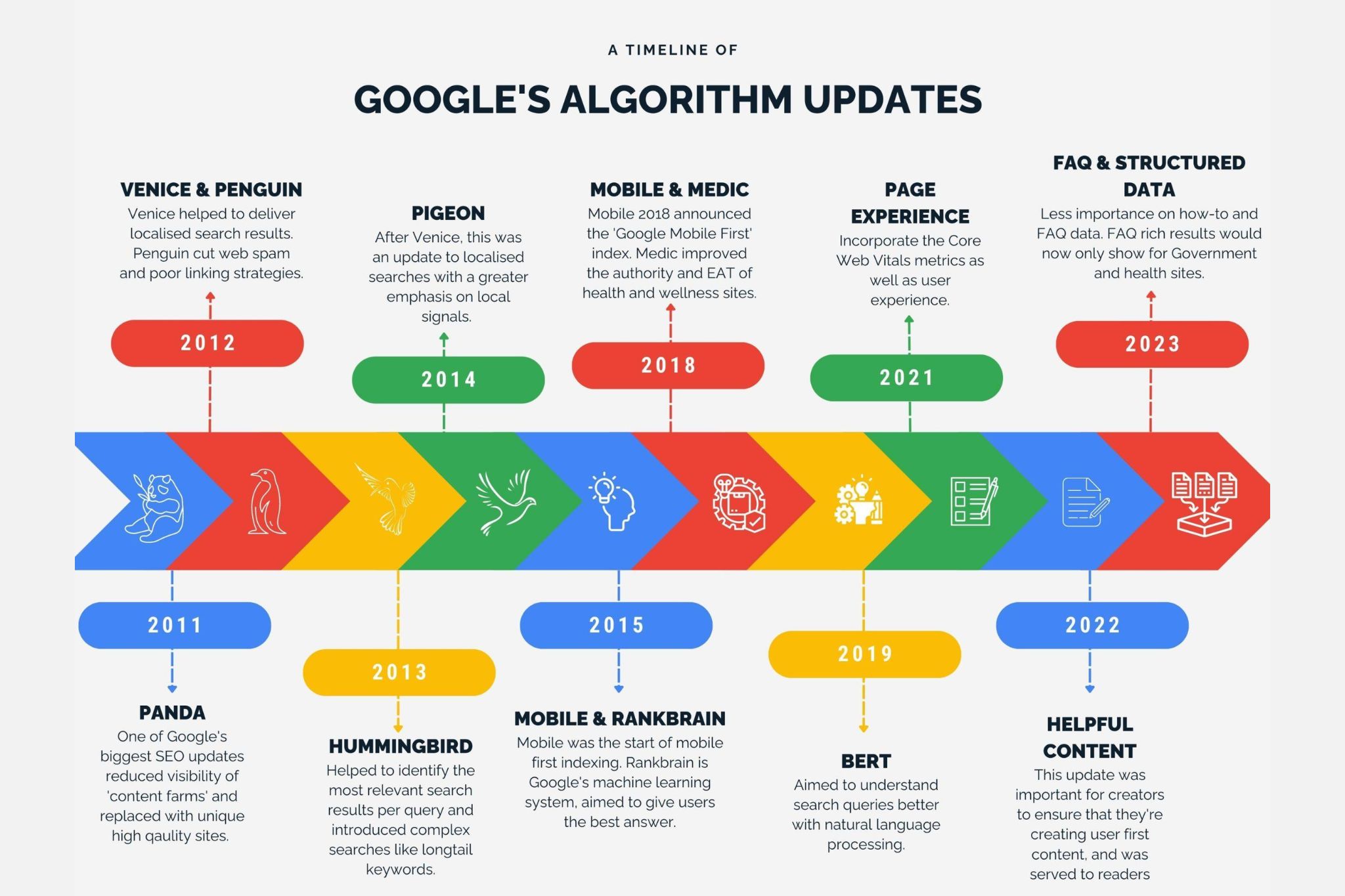
To understand where we are today, it helps to look at how we got here. Google’s relationship with website speed as a ranking factor has been evolving for over a decade, but it’s reached new levels of importance in recent years.
Back in 2010, Google first announced that site speed would be a ranking signal for desktop searches. At the time, it was a relatively minor factor, affecting only a small percentage of queries. Fast forward to 2018, and Google introduced the “Speed Update,” making page speed a ranking factor for mobile searches as well. This was significant because mobile traffic had already surpassed desktop traffic globally.
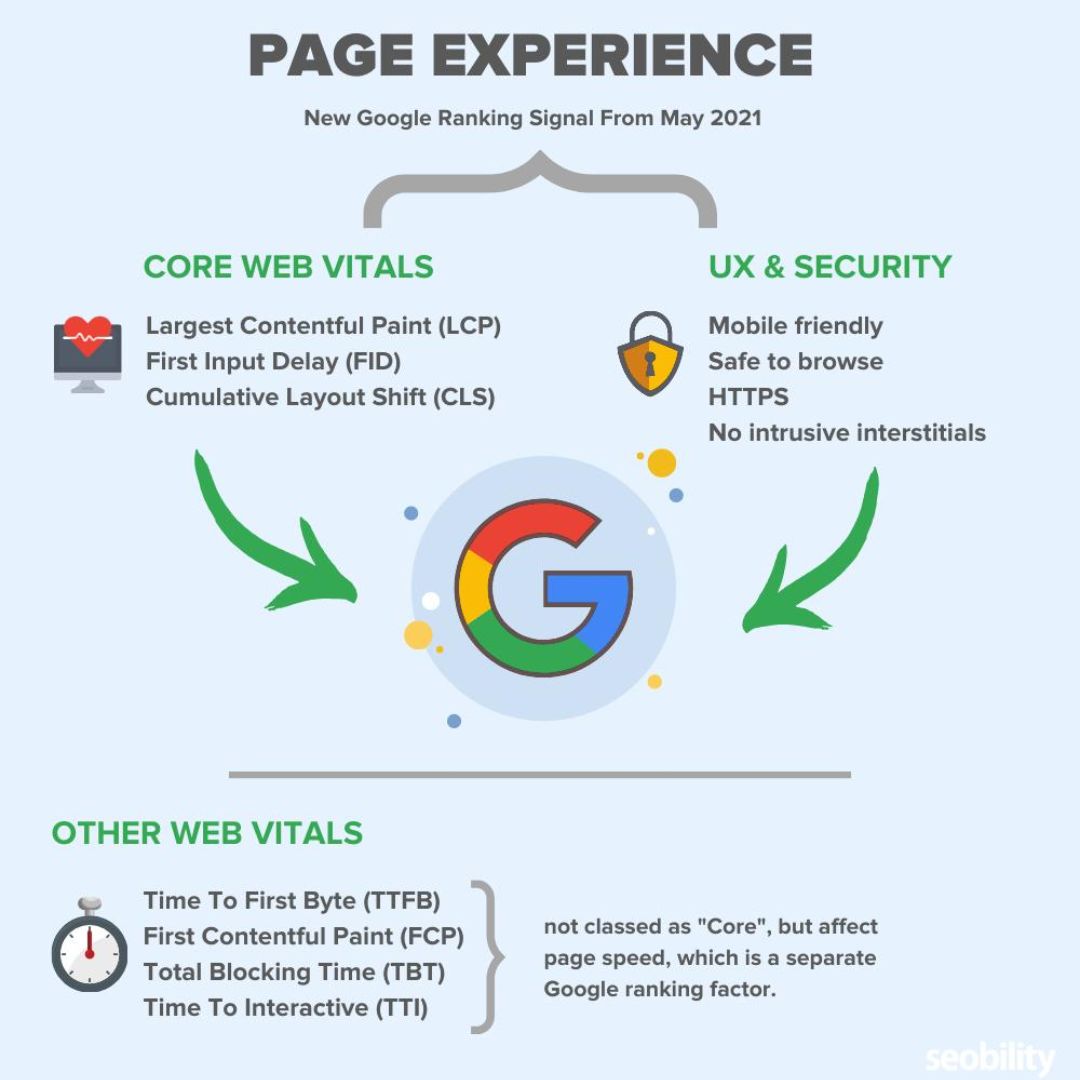
But the real game-changer came with Google’s introduction of Core Web Vitals in 2020, which was fully rolled out in 2021. These metrics—Largest Contentful Paint (LCP), First Input Delay (FID), and Cumulative Layout Shift (CLS)—gave webmasters concrete, measurable standards for page experience. By 2026, these metrics have become even more refined and crucial to search rankings.
Google’s philosophy is simple: they want to provide users with the best possible experience. Since slow websites frustrate users and cause them to abandon their search journey, Google actively discourages slow sites by ranking them lower. It’s a logical approach that aligns Google’s business interests (keeping users happy and using their search engine) with website owners’ interests (attracting more visitors).
The search landscape has also become increasingly competitive. With billions of websites competing for attention, Google needs efficient ways to differentiate between them. Loading speed provides a clear, objective metric that reflects both technical competence and commitment to user experience.
Understanding How Google Measures Website Speed

Before we can optimize for speed, we need to understand how Google actually measures it. This isn’t as straightforward as simply timing how long a page takes to load, because the user experience of “loading” involves multiple stages and components.
Core Web Vitals: The Holy Trinity of Speed Metrics
Google’s Core Web Vitals focus on three key aspects of user experience:
Largest Contentful Paint (LCP) measures loading performance. Specifically, it marks the point when the largest content element visible in the viewport becomes fully rendered. This could be an image, video, or block of text. Google considers an LCP of 2.5 seconds or less as “good.” Why does this matter? Because LCP represents when users perceive that the main content has loaded, even if other elements are still rendering.
Think about reading a news article. You don’t care if the sidebar ads or footer are still loading—you want to see the headline and article text. That’s what LCP measures. A slow LCP means users are staring at a blank or partially loaded page, wondering if they clicked a broken link.
First Input Delay (FID), which is being replaced by Interaction to Next Paint (INP) in 2024-2026, measures interactivity. It captures the time from when a user first interacts with your page (clicks a link, taps a button, uses a custom JavaScript control) to when the browser can actually respond to that interaction. Google considers an FID of 100 milliseconds or less as good.
This metric addresses a frustrating experience we’ve all had: clicking something on a website and nothing happens. You click again, maybe a third time, and suddenly three windows open or you submit a form three times. This happens when the page is busy loading JavaScript and can’t process your input immediately. Poor FID creates frustration and erodes trust.
Cumulative Layout Shift (CLS) measures visual stability. It quantifies how much unexpected layout shift occurs during the entire lifespan of a page. A good CLS score is 0.1 or less. This metric addresses another universal frustration: you’re about to click a button when suddenly an ad loads above it, shifting everything down, and you accidentally click the ad instead.
CLS is about predictability and control. When elements on a page shift around as it loads, it creates a jarring, annoying experience. It can also have real consequences—imagine misclicking “Delete” instead of “Save” because a button shifted at the last moment.
Beyond Core Web Vitals
While Core Web Vitals are the official metrics, Google considers other speed-related factors too. Time to First Byte (TTFB) measures how quickly your server responds to requests. Total page size affects how much data needs to be transferred. The number of HTTP requests impacts how many server roundtrips are necessary. All these technical details contribute to the overall speed experience.
Google also uses real-world data from Chrome users (Chrome User Experience Report or CrUX) to understand how actual users experience your website in the wild, across different devices, locations, and network conditions. This means your site might perform differently in Google’s eyes depending on where your users are located and what devices they use.
The Direct Connection Between Speed and Rankings
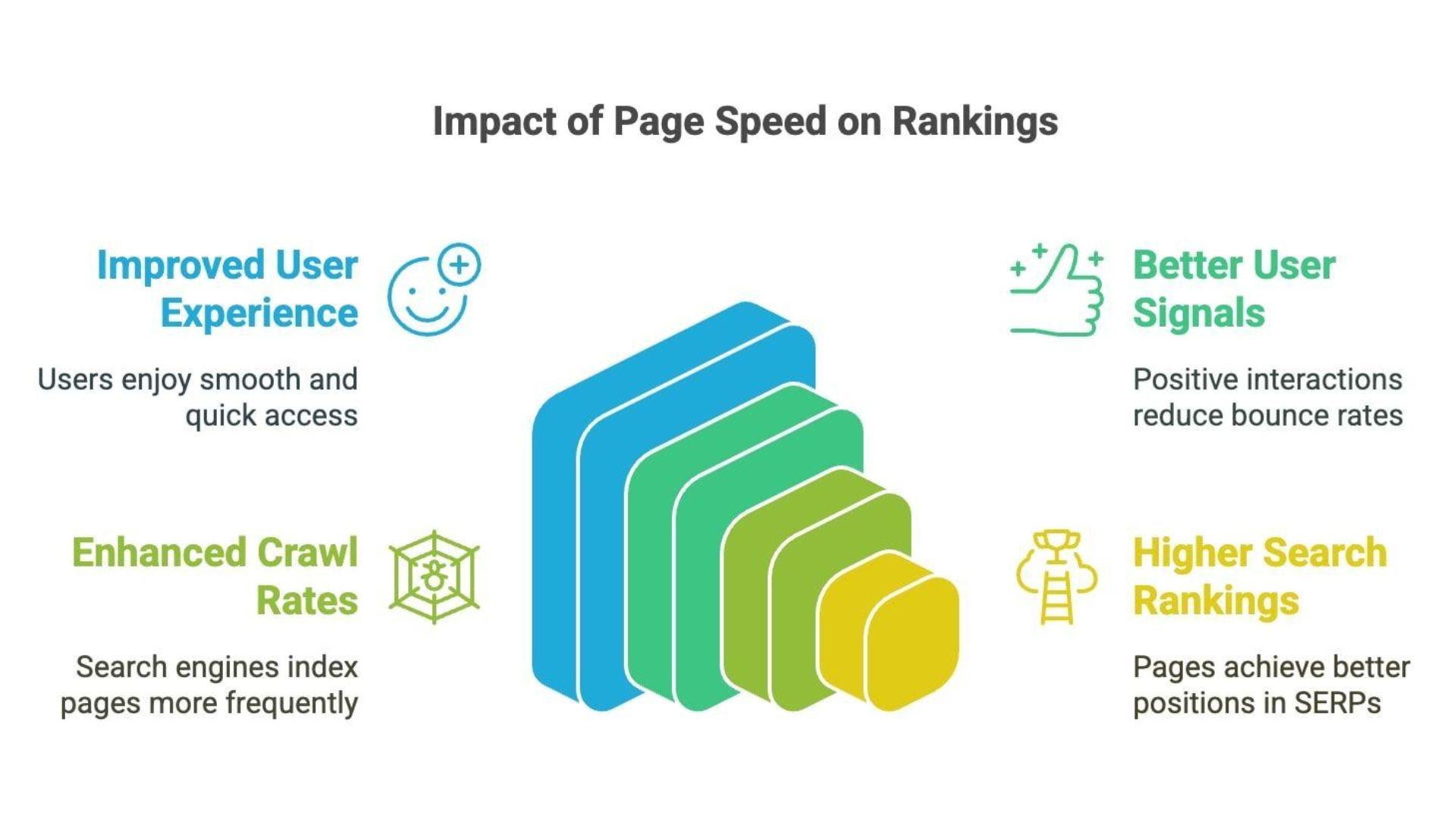
Now let’s get to the heart of the matter: exactly how does loading speed affect your Google rankings? The relationship is both direct and indirect, creating a multiplier effect that can significantly impact your search visibility.
Speed as a Direct Ranking Signal
Google has explicitly confirmed that page speed is a ranking factor. When all other factors are relatively equal—content quality, relevance, authority, backlinks—a faster website will outrank a slower one. This direct impact might seem straightforward, but it’s nuanced.
The speed ranking factor doesn’t work on a linear scale. A website that loads in 1 second doesn’t automatically rank twice as high as one that loads in 2 seconds. Instead, there are threshold effects. The most dramatic ranking benefits come from improving extremely slow sites (5+ seconds) to moderate speeds (2-3 seconds). Once you’re in the “good” range, additional speed improvements yield diminishing returns from a pure ranking perspective, though they still benefit user experience.
Google also applies speed as a ranking factor differently across different types of queries. For commercial and transactional queries—where users are looking to buy something or take action—speed carries more weight. For informational queries where users are just researching, content quality and relevance might matter more than a half-second difference in loading time.
The Indirect Impact: User Behavior Signals
Perhaps even more important than the direct ranking impact are the indirect effects that loading speed has on user behavior, which Google tracks and uses as ranking signals.
When your website loads slowly, users bounce. They hit that back button and choose a different result. Google notices this. High bounce rates signal to Google that users aren’t finding what they need on your page, which can hurt your rankings. The brutal truth is that 53% of mobile users abandon a site that takes longer than three seconds to load. That’s more than half your potential visitors gone, and Google sees every single one of them leaving.
Conversely, fast-loading websites keep users engaged. They browse more pages, spend more time on your site, and are more likely to convert (make a purchase, sign up, contact you, etc.). These positive engagement signals tell Google that your website is providing value, which can boost your rankings.
This creates a virtuous cycle for fast websites: higher rankings lead to more traffic, positive user signals from that traffic reinforce the rankings, leading to even more traffic. Slow websites get caught in the opposite cycle: poor rankings lead to less traffic, the traffic that does arrive bounces quickly, further hurting rankings.
Mobile-First Indexing Amplifies the Speed Factor
Since Google switched to mobile-first indexing, the mobile version of your website is what Google primarily uses for ranking. This makes mobile loading speed absolutely critical. Mobile networks are generally slower than broadband connections, and mobile devices have less processing power than desktop computers, making speed optimization even more crucial for mobile.
A website that performs adequately on desktop but poorly on mobile is severely handicapped in Google’s rankings. With mobile traffic dominating the web—accounting for approximately 60% of all web traffic in 2026—ignoring mobile speed is essentially giving up on the majority of your potential audience.
The Real-World Impact: What Slow Speed Costs You
Let’s talk numbers, because understanding the business impact of slow loading speeds makes the case for optimization undeniable.
Traffic and Visibility Losses
Studies have consistently shown that even small improvements in loading speed can lead to significant ranking improvements. Moving from page two to page one of Google results can increase your traffic by 500% or more. The difference between position 10 and position 1 on the first page is also dramatic—the first position gets roughly 10 times more clicks than the tenth position.
When your website is slow, you’re not just losing a few rankings positions—you’re potentially losing thousands of visitors per month. For a business, this translates directly to lost leads, sales, and revenue. For a blog or content site, it means lost readership and advertising revenue.
Conversion Rate Decimation
Speed doesn’t just affect how many people visit your site; it dramatically affects what they do once they arrive. The data is clear and consistent across industries: faster websites convert better.
Amazon found that every 100 milliseconds of latency cost them 1% in sales. Walmart discovered that for every 1-second improvement in page load time, conversions increased by 2%. For an e-commerce business doing $1 million in annual revenue, a 2-second improvement could mean an additional $40,000 per year.
The psychology behind this is straightforward: slow loading creates friction, frustration, and doubt. Users wonder if the site is trustworthy, if their transaction will go through, if it’s worth the wait. Fast loading, by contrast, creates confidence and momentum. The purchase process feels smooth, which makes users more likely to complete it.

Brand Perception and Trust
Your website speed affects how users perceive your brand. A slow website suggests unprofessionalism, technical incompetence, or lack of investment in quality. It makes users question whether they want to do business with you.
In a fascinating study, users were asked to evaluate two identical websites with different loading speeds. They consistently rated the slower website as less trustworthy, less professional, and lower quality—even though the content, design, and offerings were identical. First impressions matter, and in the digital world, speed is often the first impression.
Technical Factors That Slow Your Website Down

Understanding what makes websites slow is the first step toward making them fast. Let’s break down the most common culprits.
Oversized and Unoptimized Images
Images are often the largest files on a webpage, and they’re the most common cause of slow loading times. A single unoptimized image can be several megabytes in size, when it should be measured in kilobytes.
Many website owners upload images straight from their camera or stock photo service without optimization. A 5-megabyte hero image might look sharp, but it’s killing your loading speed. Even worse, many sites load all images on a page immediately, even images that are below the fold and not visible until the user scrolls down.
Bloated Code and Too Many HTTP Requests
Every element on your webpage—images, scripts, stylesheets, fonts—requires a separate HTTP request to your server. Each request takes time, and while modern browsers can make multiple parallel requests, there’s still a limit. Websites with hundreds of requests will inevitably load slowly.
Additionally, messy, unoptimized code creates unnecessary file size. Whitespace in CSS and JavaScript, redundant code, and using multiple files when one would suffice all contribute to bloat. Many websites built on platforms like WordPress accumulate plugins over time, each adding its own scripts and styles, ballooning the total code that needs to be loaded.
Server Response Time and Hosting Quality
Your web hosting is the foundation of your website’s speed. Cheap, shared hosting plans might save you money upfront, but they often result in slow server response times, especially during traffic spikes when you’re sharing server resources with dozens or hundreds of other websites.
Server location also matters. If your server is in New York but most of your users are in India, there’s significant latency just from the physical distance data needs to travel. Each millisecond of server response time adds up.
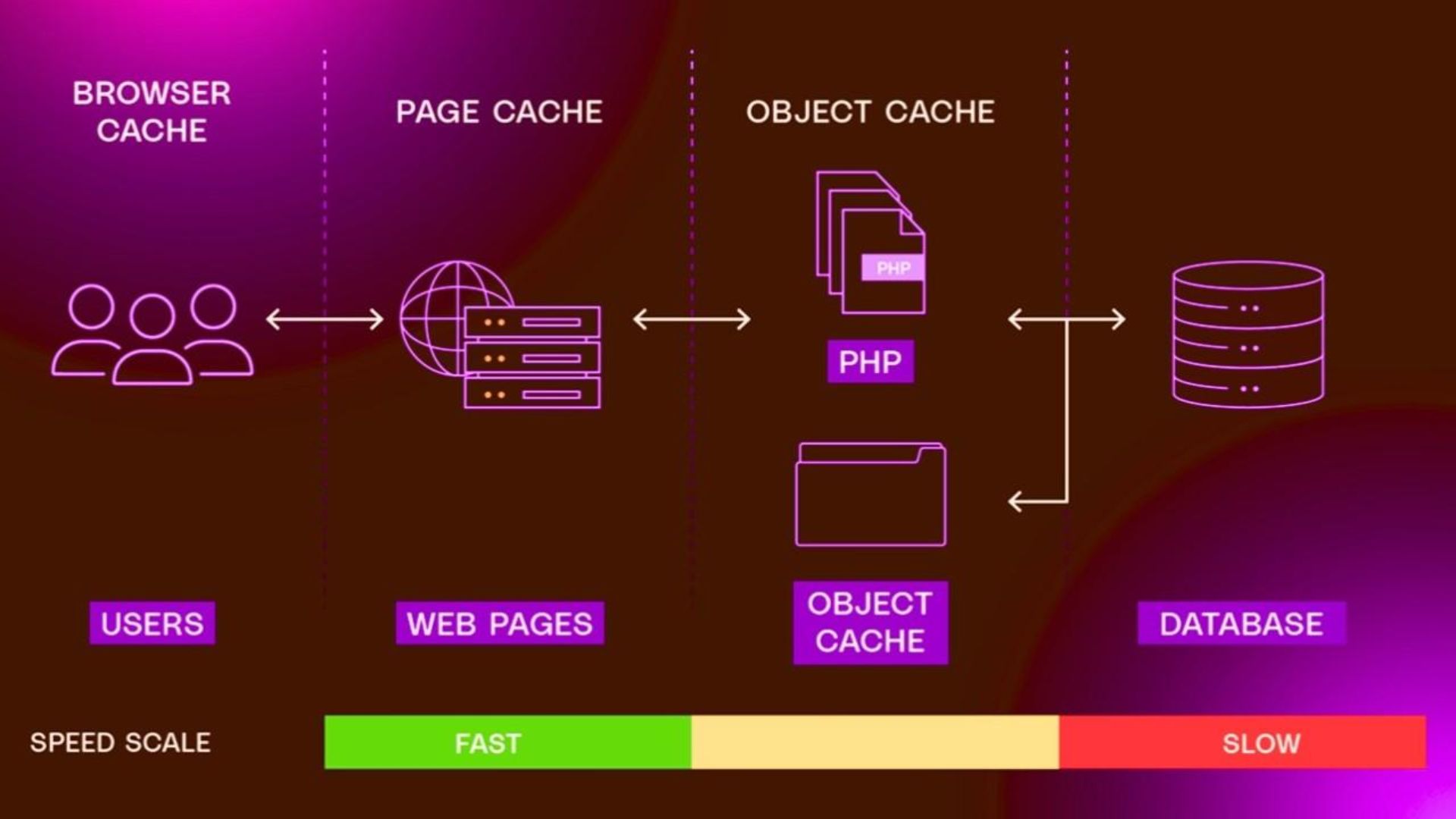
Lack of Caching
Caching temporarily stores copies of files so they don’t need to be regenerated or downloaded every time someone visits your site. Without proper caching, every single page visit requires the server to process everything from scratch and the browser to download everything anew.
Browser caching tells visitors’ browsers to store certain files locally, so they don’t need to re-download them on subsequent visits. Server-side caching generates static versions of dynamic pages so the server doesn’t need to query the database and build the page for every single visitor.
Unoptimized Database Queries
For websites built on content management systems like WordPress, database queries can be a major slowdown. Every time a page loads, the system might need to query the database multiple times to retrieve content, check user permissions, load comments, and more.
Inefficient database queries, tables full of spam comments or old data, and lack of database optimization can all contribute to slow loading times. The more complex your site becomes, the more potential there is for database bottlenecks.
Third-Party Scripts and Widgets
Every time you add a social media widget, chat plugin, analytics script, advertising code, or third-party tool to your website, you’re adding potential slowdown. These scripts often load from external servers, meaning your website’s loading time is partially dependent on those third-party servers’ performance.
Some scripts are particularly problematic, using render-blocking JavaScript that prevents the rest of your page from loading until they finish. Even worse, if a third-party server goes down or responds slowly, it can drag your entire website down with it.
How to Diagnose Your Website’s Speed Issues

Before you can fix speed problems, you need to identify exactly where the issues are. Fortunately, there are excellent tools available to help you diagnose speed issues with precision.
Google PageSpeed Insights: Your Starting Point
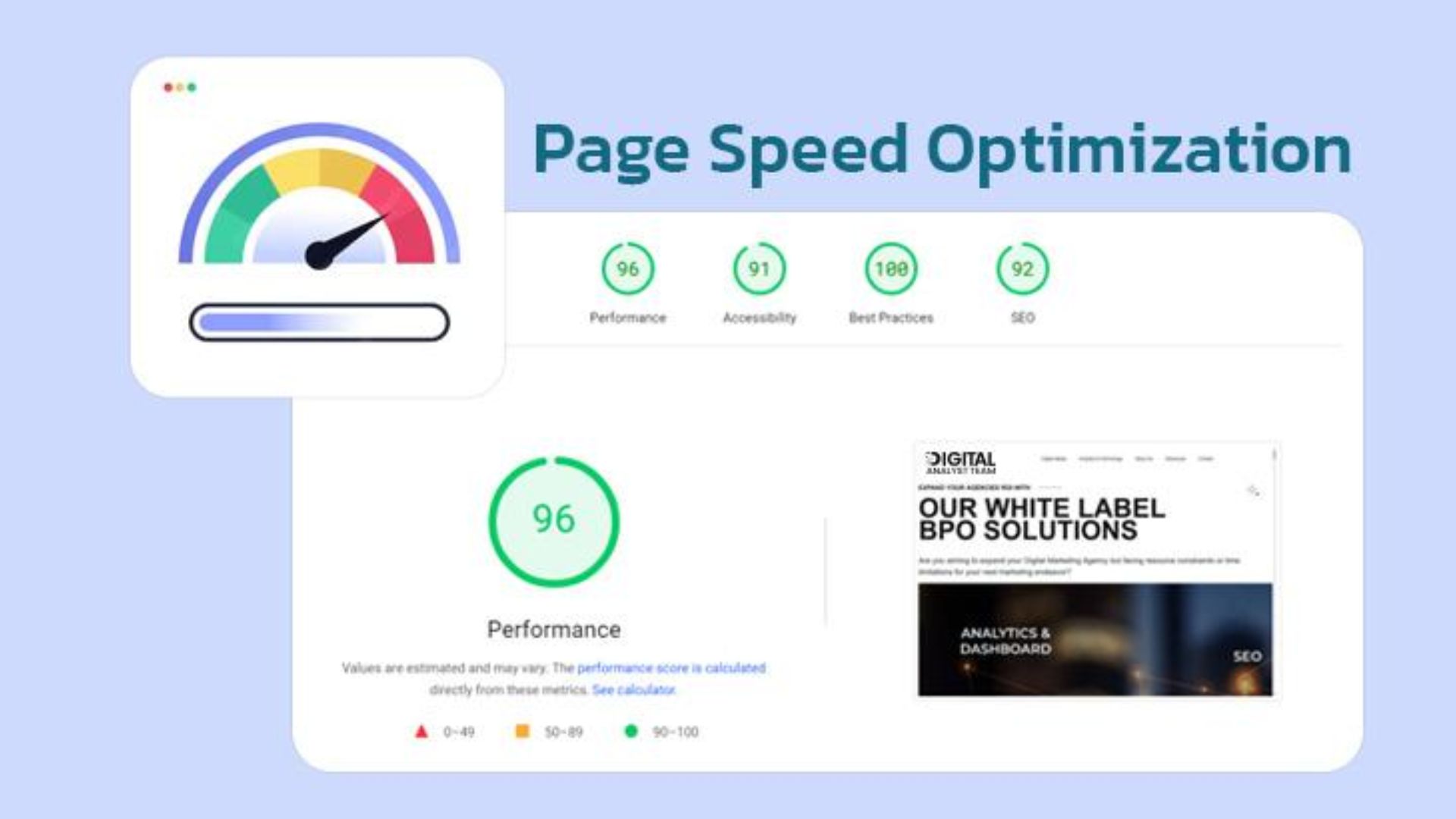
Google PageSpeed Insights is free, authoritative (it’s from Google itself), and provides both lab data (simulated loading in a controlled environment) and field data (real user experiences from the Chrome User Experience Report).
To use it, simply enter your URL and Google will analyze your site, providing both mobile and desktop scores. You’ll get a performance score from 0-100, with breakdowns of your Core Web Vitals metrics, and specific recommendations for improvement.
Pay attention to both the scores and the opportunities section, which identifies specific issues ranked by potential impact. Google tells you not just what’s wrong, but approximately how much time you could save by fixing each issue.
GTmetrix: Detailed Performance Analysis
GTmetrix provides a more detailed technical analysis than PageSpeed Insights. It shows you exactly how your page loads, element by element, in a waterfall chart. This visualization helps you see which resources are taking the longest to load and identify bottlenecks.
GTmetrix also allows you to test from different locations and on different connection speeds, helping you understand how users in different parts of the world experience your site. This geographic testing is crucial if you have an international audience.
WebPageTest: Advanced Testing
For those who want to dig even deeper, WebPageTest offers advanced options including testing on real mobile devices, different browsers, and various connection speeds. You can even capture video of the loading process to see exactly what users see as your page renders.

The filmstrip view is particularly valuable—it shows screenshots of your page at different points during loading, helping you identify when meaningful content appears and when the page becomes interactive.
Chrome DevTools: In-Browser Diagnosis
Google Chrome’s built-in DevTools (accessible by pressing F12) includes powerful performance analysis features. The Lighthouse audit provides similar insights to PageSpeed Insights but with more detail and the ability to test on your local development environment before pushing changes live.
The Network tab shows exactly what resources are loading, how large they are, and how long each takes. The Coverage tab shows how much of your CSS and JavaScript is actually being used on the page versus sitting idle. The Performance tab provides detailed timing information about every aspect of page rendering.
Actionable Strategies to Improve Your Website Speed
Now for the most important part: actually making your website faster. These strategies range from quick wins to more involved optimizations, but all can significantly improve your loading speed.
Image Optimization: The Lowest-Hanging Fruit
Start by compressing all your images. Tools like TinyPNG, ImageOptim, or ShortPixel can reduce image file sizes by 50-80% without visible quality loss. For WordPress users, plugins like Smush or Imagify can automate this process for existing and future images.
Use next-generation image formats like WebP, which provides superior compression compared to JPEG and PNG. Most modern browsers support WebP, and you can provide fallbacks for older browsers.
Implement responsive images using the srcset attribute, which allows browsers to download appropriately sized images based on the user’s device. There’s no reason to send a 2000-pixel-wide image to a mobile phone with a 375-pixel screen.
Most importantly, implement lazy loading for images below the fold. This technique delays loading images until they’re about to enter the viewport, dramatically reducing initial page load time. Modern browsers support native lazy loading with just a simple loading=”lazy” attribute on img tags.
Minimize and Combine Code Files
Minification removes unnecessary characters from your code—whitespace, comments, and formatting—without changing functionality. This can reduce file sizes by 30-40%. Tools like UglifyJS for JavaScript and CSSNano for CSS automate this process.
Combine multiple CSS or JavaScript files into single files to reduce HTTP requests. However, be strategic about this—with HTTP/2, the benefits of file combination are less significant than in the past, and you need to balance reduction in requests against browser caching efficiency.
Remove unused code. Many websites load entire CSS frameworks when they only use a fraction of the styles. Tools like PurgeCSS can identify and remove unused CSS, dramatically reducing stylesheet sizes.
Leverage Browser and Server Caching
Configure your server to tell browsers how long they should cache different types of files. Static resources like images, CSS, and JavaScript that rarely change should be cached for long periods (months or even a year). You can implement cache busting (changing the filename when you update a file) to ensure users get updated versions when necessary.
For WordPress and similar platforms, caching plugins like WP Rocket, W3 Total Cache, or WP Super Cache can implement both browser caching and server-side page caching, generating static HTML versions of your pages to avoid repeatedly processing PHP and querying databases.
Implement a Content Delivery Network (CDN)
A CDN stores copies of your website’s static files on servers distributed around the world. When a user visits your site, they download files from the server closest to them geographically, reducing latency.
CDNs like Cloudflare, KeyCDN, or BunnyCDN are relatively affordable and easy to implement. For many websites, simply adding a CDN can reduce loading times by 40-60%, especially for international visitors.
Modern CDNs also offer additional optimization features like automatic image compression, minification, and even mobile optimization, making them a comprehensive speed solution.
Upgrade Your Hosting
If you’re on shared hosting and experiencing slow server response times, consider upgrading to better hosting. VPS (Virtual Private Server) hosting gives you dedicated resources. Managed WordPress hosting providers like WP Engine or Kinsta are optimized specifically for WordPress performance.
For high-traffic sites, cloud hosting solutions like AWS, Google Cloud, or DigitalOcean offer scalability and excellent performance, though they require more technical knowledge to configure properly.
Optimize Database Performance
For WordPress sites, plugins like WP-Optimize can clean up your database by removing spam comments, post revisions, and transient options. Schedule regular database optimization to prevent bloat.
For custom applications, ensure your database queries are optimized with proper indexing. Use query monitoring tools to identify slow queries and optimize them. Consider implementing database caching with tools like Redis or Memcached for frequently accessed data.
Defer and Async JavaScript Loading
JavaScript can be render-blocking, meaning the browser can’t display content until the JavaScript loads and executes. Using the async or defer attributes on script tags allows the HTML to parse and render while JavaScript loads in the background.
Async loads the script asynchronously and executes it as soon as it’s available. Defer loads the script asynchronously but only executes it after the HTML parsing is complete. For most scripts, defer is the better choice as it maintains execution order.
Reduce Server Response Time
Optimize your server configuration. Use the latest PHP version (PHP 8.x is significantly faster than older versions). Enable server-level caching. Consider using a lightweight web server like Nginx instead of Apache for static content.

For WordPress, reduce plugins to only those you actually need. Each plugin adds overhead, and some are notoriously slow. Regularly audit your plugins and remove or replace poorly coded ones.
Eliminate Render-Blocking Resources
Critical CSS—the styles needed to render above-the-fold content—should be inlined in the HTML. Non-critical CSS can be loaded asynchronously. This allows the browser to render visible content immediately while still loading complete styles for the full page.
Tools like Critical or Critters can automatically extract and inline critical CSS. For WordPress, plugins like Autoptimize or WP Rocket can handle this automatically.
Optimize Web Fonts
Web fonts can significantly slow down page rendering. Use only the font weights and styles you actually need—loading six weights of a font family when you use only two is wasteful.
Implement font-display: swap in your CSS to show fallback fonts immediately while web fonts load, preventing invisible text during loading. Consider using system fonts for body text and saving web fonts for headings or accent text.
Host fonts locally rather than loading from Google Fonts or other external services. This reduces DNS lookups and gives you more control over caching.
Mobile Speed Optimization: A Special Focus
Given Google’s mobile-first indexing and the dominance of mobile traffic, mobile speed deserves special attention. Many techniques that work for desktop need additional consideration for mobile.
Understand Mobile Constraints
Mobile devices have less processing power than desktops, making JavaScript execution slower. Mobile networks, even 4G and 5G, often have higher latency than broadband connections. Mobile users are frequently on the go, in areas with spotty coverage, making reliability as important as speed.
This means aggressive optimization is crucial for mobile. What might be acceptable performance on desktop could be unacceptably slow on mobile.
Implement Responsive Design Properly
Responsive design shouldn’t just mean showing the same content in different layouts—it should mean optimizing content delivery for different devices. Use responsive images to serve appropriately sized images. Consider conditionally loading certain features only on desktop where they make sense.
Avoid techniques like hiding desktop content with CSS on mobile. The content still needs to download even though it’s not visible, wasting bandwidth and slowing loading.
Test on Real Devices
Simulator testing is helpful, but nothing replaces testing on actual mobile devices with real network conditions. Google Chrome’s DevTools can throttle network speed to simulate 3G or 4G connections, helping you understand the mobile experience without perfect Wi-Fi.
If possible, test on older devices too. Your latest-model smartphone might handle your website fine, but what about users with three-year-old budget devices? These users still matter to Google’s rankings.

Accelerated Mobile Pages (AMP): Consider the Trade-offs
Google’s AMP framework creates stripped-down versions of pages that load extremely quickly on mobile. While AMP adoption has slowed in recent years as regular mobile optimization has improved, it can still be valuable for content publishers.
However, AMP comes with restrictions on JavaScript and design flexibility. For many businesses, properly optimizing standard pages delivers excellent mobile performance without AMP’s limitations.
The Relationship Between Speed and Other SEO Factors
Website speed doesn’t exist in a vacuum—it interacts with other SEO factors in important ways that affect your overall strategy.
Speed vs. Content Quality
Google has been clear that while speed is a ranking factor, content quality and relevance are more important. A slow page with exceptional, unique content that perfectly matches search intent will still outrank a fast page with mediocre content.
However, this doesn’t mean you can ignore speed if your content is good. The combination of great content and fast loading creates a compounding advantage. Plus, slow loading can prevent users from ever seeing your great content if they bounce before it loads.
Speed and User Experience Signals
Speed is just one component of overall user experience. Other factors—mobile-friendliness, clean design, easy navigation, secure connections (HTTPS), lack of intrusive interstitials—all contribute to how Google evaluates your site’s quality.
These factors reinforce each other. A fast-loading site with terrible navigation is still frustrating. A beautifully designed site that takes 10 seconds to load defeats its own purpose. Holistic optimization across all user experience factors delivers the best results.
Technical SEO Foundation
Speed optimization often goes hand-in-hand with other technical SEO improvements. Implementing structured data, fixing crawl errors, improving site architecture, and optimizing for mobile all contribute to better overall SEO performance.
Think of speed as one pillar in your technical SEO foundation. Strengthening it helps support everything else you’re building.
Common Speed Optimization Mistakes to Avoid
As you work on improving your website speed, watch out for these common pitfalls that can waste time or even make things worse.
Over-Optimization and Breaking Functionality
In the rush to improve speed scores, some website owners aggressively optimize to the point of breaking functionality. Deferring all JavaScript might improve initial load time but could break critical features. Overly aggressive image compression can make images look terrible.
Always test thoroughly after making optimization changes. Make sure contact forms still work, images look good, navigation functions properly, and analytics still track correctly. Speed is important, but a broken website that loads fast isn’t useful to anyone.
Ignoring Actual User Experience
Don’t become obsessed with perfect PageSpeed scores at the expense of actual user experience. Google’s testing tools are helpful guides, but they don’t capture everything about real-world usage.
Sometimes a slightly slower loading time is acceptable if it delivers a significantly better user experience. Video backgrounds, interactive elements, and rich media can enhance engagement even if they add some loading time. Balance is key.

Focusing Only on Homepage Speed
Many website owners optimize their homepage but neglect interior pages, product pages, or blog posts. Since Google evaluates your entire site and users can land on any page from search results, all your important pages need to be fast.
Product pages and blog posts are often where conversions happen, making their speed particularly crucial. Don’t let them languish with slow loading times.
Not Monitoring After Initial Optimization
Website speed isn’t a one-time fix—it’s an ongoing commitment. As you add content, install plugins, or make design changes, performance can degrade. Regular monitoring helps you catch speed issues before they significantly impact rankings.
Set up automated monitoring with tools like Google Search Console or uptime monitoring services that track loading speed. Review your Core Web Vitals data monthly and investigate any degradation.
Creating a Speed Optimization Workflow
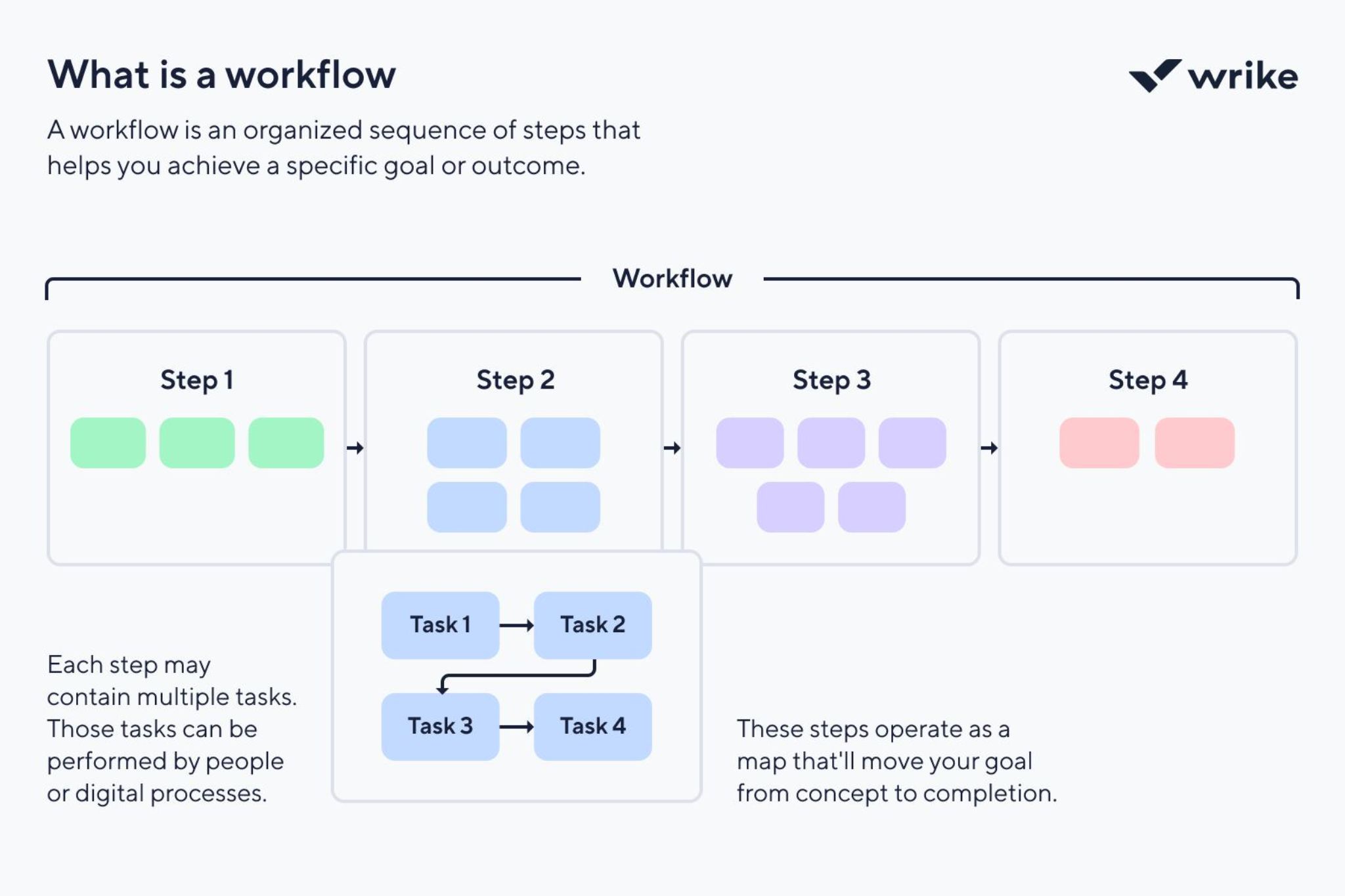
Sustainable speed optimization requires an ongoing process, not just a one-time project. Here’s how to build speed consciousness into your regular workflow.
Before Publishing New Content
Make speed checks part of your content publishing process. Before publishing new blog posts or pages, check that images are optimized, videos are embedded properly (not uploaded directly, which creates huge files), and the page loads quickly.
Create a pre-publish checklist that includes speed optimization items. This prevents speed debt from accumulating over time.
Regular Audits and Maintenance
Schedule quarterly speed audits of your entire website. Test a representative sample of pages—homepage, key landing pages, blog posts, product pages—and track loading times over time.
Watch for trends. If your site is gradually slowing down, investigate why. Often it’s due to image accumulation, plugin bloat, or database growth. Catching these trends early makes them easier to address.
Testing After Major Changes
Whenever you make significant changes—theme updates, new features, design overhauls—test speed thoroughly. Major changes can have unintended performance impacts.
Test before pushing changes live if possible. Use staging environments to identify and fix speed issues before they affect your users and rankings.
Staying Current with Best Practices
Web performance best practices evolve as technology advances. HTTP/3, new image formats, updated compression algorithms, and improved server technologies all create new optimization opportunities.
Follow web performance blogs, attend webinars, and periodically review your optimization strategy to ensure you’re using current techniques. What was optimal three years ago might be outdated now.
The Future of Speed and SEO

As we look toward the future, several trends will shape how speed affects search rankings and user experience.
Faster Networks, Higher Expectations
As 5G becomes ubiquitous and internet speeds continue increasing, user expectations rise correspondingly. What feels fast today will feel slow tomorrow. The three-second loading time that’s acceptable now might be too slow in a couple years.
This means continuous optimization will be necessary. You can’t optimize once and forget about it—you need to keep improving to meet rising standards.
More Sophisticated Metrics
Google continues refining how it measures user experience. The evolution from FID to INP (Interaction to Next Paint) represents more sophisticated understanding of interactivity. Future metrics will likely capture even more nuanced aspects of user experience.
Staying informed about new metrics and preparing for them before they officially impact rankings will give forward-thinking website owners an advantage.
AI and Automated Optimization
Artificial intelligence and machine learning are being applied to website optimization. Tools that automatically optimize images, code, and content delivery are becoming more sophisticated. Hosting providers are implementing AI-driven caching and optimization.
While these tools won’t replace understanding fundamentals, they’ll make advanced optimization techniques accessible to more website owners, potentially raising the baseline for acceptable performance.
Integration with Other Ranking Factors
Speed will likely become more tightly integrated with other ranking factors rather than being evaluated in isolation. Google’s algorithms are moving toward holistic evaluation of user experience, where speed, mobile-friendliness, security, content quality, and relevance are weighed together in sophisticated ways.
This reinforces the importance of comprehensive SEO strategy rather than focusing narrowly on any single factor.
Conclusion: Speed as Competitive Advantage

Website loading speed is no longer optional—it’s essential. Google has made it abundantly clear that slow websites will be penalized in rankings, and user behavior data consistently shows that slow loading leads to abandonment, regardless of how good your content might be.
The good news is that speed optimization is largely within your control. Unlike earning backlinks or creating viral content, improving loading speed is primarily a technical challenge with clear solutions. The tools to diagnose issues are free and accessible. The techniques to fix problems are well-documented. The results are measurable and often dramatic.
Start with the quick wins: optimize images, implement caching, and use a CDN. These changes alone can often cut loading times in half. Then tackle more advanced optimizations: code minification, database optimization, and server upgrades.
Remember that speed optimization is a journey, not a destination. Technology evolves, user expectations rise, and your website changes over time. Build speed consciousness into your regular workflow. Make it part of how you think about your website, not just a special project you undertake once and forget.
The websites that will dominate search results in the years ahead won’t just have great content—they’ll deliver that content instantly, on any device, anywhere in the world. They’ll create seamless experiences where users never have to wait, wonder, or feel frustrated.
Your competitors are optimizing their speed right now. The question is: will you stay ahead of them or watch them overtake you in search rankings? The choice—and the speed—is yours.